Google Cloud architecture template
Google Cloud 3-tier web app
Global Application Load Balancer with Cloud Armor and Cloud CDN, Compute Engine instance groups, Cloud SQL and Memorystore.
Free to start. Updated .
When to use it
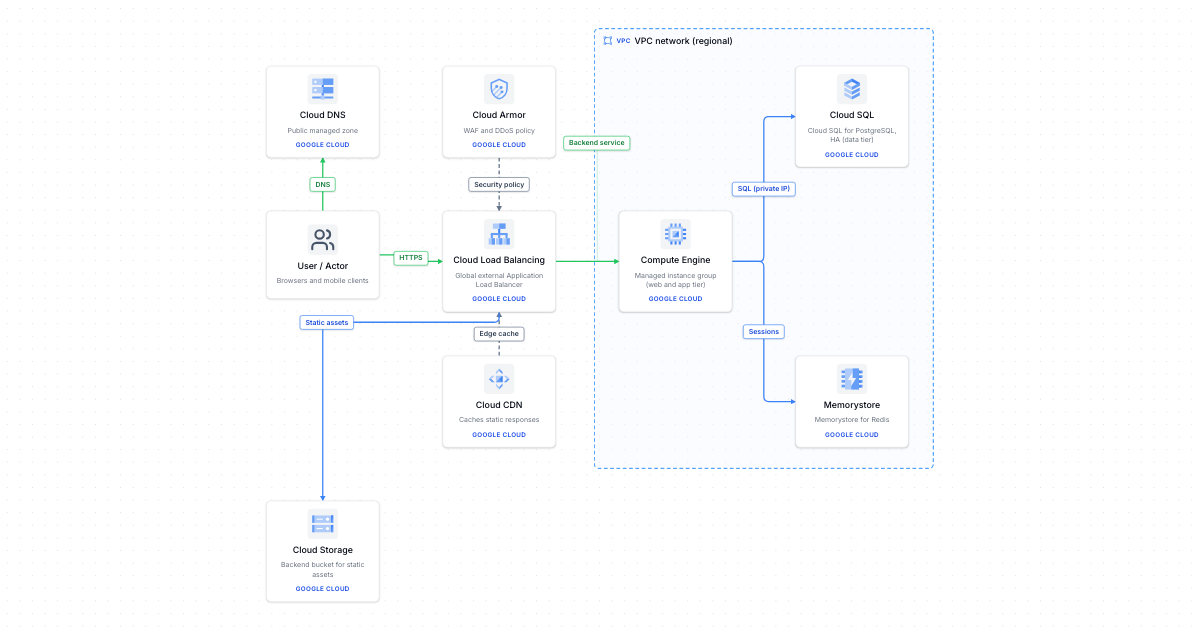
Use this template for a traditional web application on Google Cloud. A global external Application Load Balancer gives users a single anycast IP address, Cloud Armor applies WAF and DDoS rules on it, and Cloud CDN caches static responses at the edge. Static assets are served from a Cloud Storage backend bucket. Dynamic requests go to a regional managed instance group of Compute Engine virtual machines that autoheals and autoscales. Cloud SQL for PostgreSQL in high-availability mode holds the data over a private IP, and Memorystore for Redis keeps sessions out of the instances.
Instance groups give you full control of the runtime but leave patching and image builds to you. If the application is a stateless container, Cloud Run behind the same load balancer removes the instance management and scales to zero. Use regional instance groups across zones, and keep the database in the same region as the instances to avoid cross-region latency and egress charges.
What's in this template
 User / ActorBrowsers and mobile clients
 Cloud DNSPublic managed zone
 Cloud ArmorWAF and DDoS policy
 Cloud Load BalancingGlobal external Application Load Balancer
 Cloud CDNCaches static responses
 Cloud StorageBackend bucket for static assets
 Compute EngineManaged instance group (web and app tier)
 Cloud SQLCloud SQL for PostgreSQL, HA (data tier)
 MemorystoreMemorystore for Redis
How it connects
- User / Actor → Cloud DNS (network): DNS
- User / Actor → Cloud Load Balancing (network): HTTPS
- Cloud Armor → Cloud Load Balancing (dependency): Security policy
- Cloud CDN → Cloud Load Balancing (dependency): Edge cache
- Cloud Load Balancing → Cloud Storage (data): Static assets
- Cloud Load Balancing → Compute Engine (network): Backend service
- Compute Engine → Cloud SQL (data): SQL (private IP)
- Compute Engine → Memorystore (data): Sessions
More Google Cloud templates
Make it your own
Open a copy in the editor, then rename, rearrange and extend it.